

Imagine checking your website analytics and discovering that your organic traffic has suddenly dropped. Your website is still online, your blog posts are published, and your SEO plugins show no obvious problems. Yet fewer people are visiting your pages from Google.
What happened?
A decline in website traffic can be frustrating, especially when you have spent months creating content, researching keywords, and improving your website. However, a traffic drop does not automatically mean your website has been penalized or that your SEO strategy has failed.
The cause could be a change in search rankings, declining interest in a topic, technical errors, outdated content, or even a problem with your analytics tracking.
The key is to identify the actual cause before making major changes.
In this guide, you will learn why website traffic drops, how to diagnose SEO problems using Google Search Console, and nine practical ways to investigate and improve your website’s organic performance.
Whether you manage a WordPress blog, a business website, or an online store, these steps can help you make more informed SEO decisions.
Why Is My Website Traffic Dropping?
Website traffic can decline for several reasons, and different causes require different solutions.
For example, if your Google rankings have fallen, you may need to investigate your content and competitors. If search impressions have declined because fewer people are searching for a topic, rewriting your article may not solve the problem.
Common reasons for an organic traffic decline include:
- Lower Google search rankings.
- Reduced search demand for your target keywords.
- Outdated or less useful content.
- Technical SEO problems.
- Changes to website URLs or page structure.
- Lower click-through rates.
- Increased competition.
- Seasonal changes in search behavior.
- Incorrect analytics or tracking configuration.
- Changes in the way people discover information through search.
Before choosing a solution, determine which pages and search queries have lost traffic.
1. Check Google Search Console Before Changing Your Website
Google Search Console should be one of your first stops when investigating a decline in Google organic traffic.
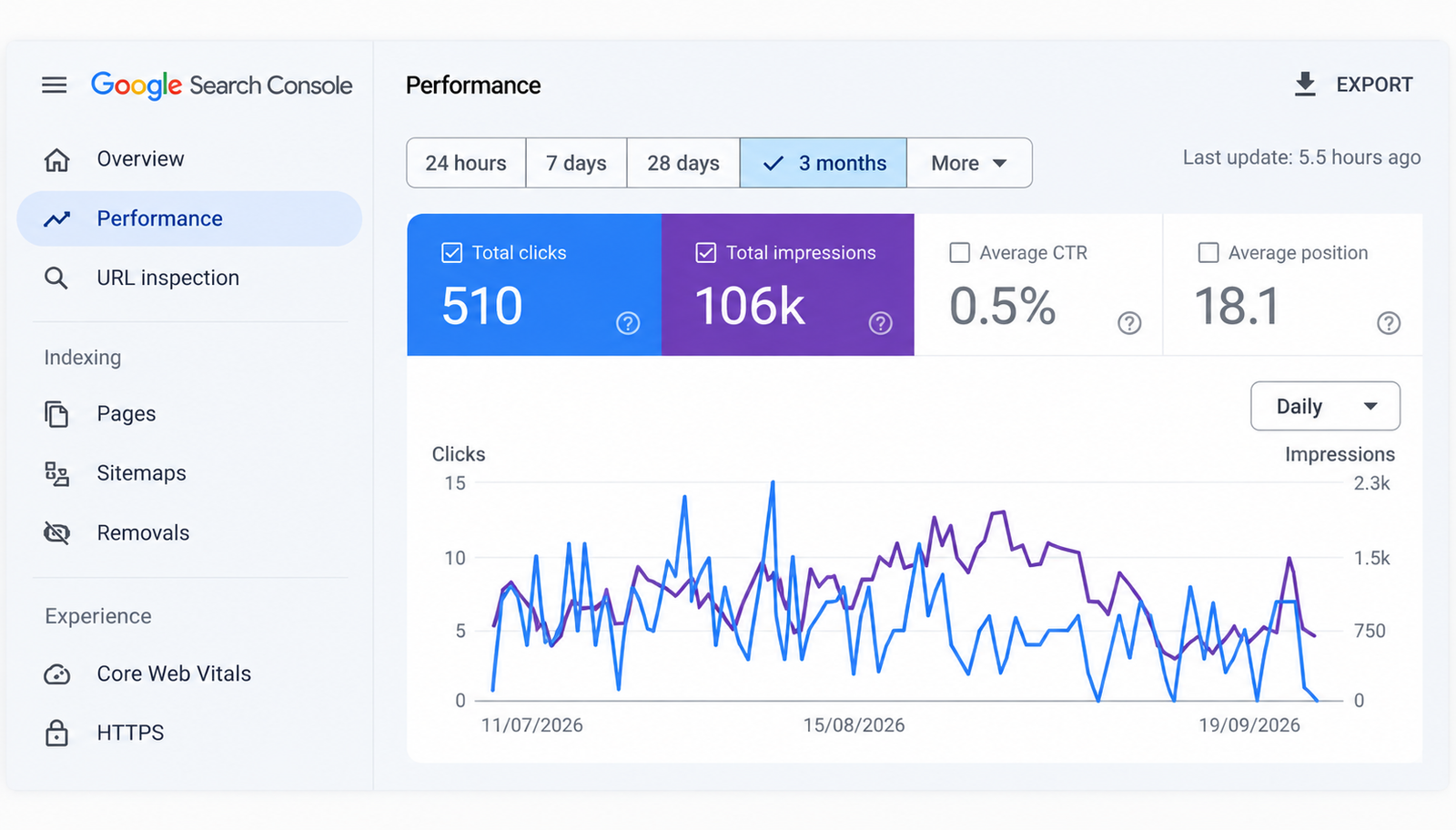
It provides information about clicks, impressions, click-through rates, and average search positions for your website’s pages and queries.
These metrics help you understand what changed.
Google Search Console can help you identify changes in clicks, impressions, and search rankings. For more guidance, read Google’s official guide to debugging drops in Google Search traffic.
How to investigate your traffic decline
Follow these steps:
- Open Google Search Console.
- Select the correct website property.
- Open the Performance report.
- Select a suitable date range.
- Compare the affected period with the previous equivalent period.
- Review clicks, impressions, click-through rate, and average position.
- Open the Pages and Queries reports to identify the biggest changes.
For a longer-term decline, also compare performance across a wider period to identify seasonal patterns.
What should you look for?
Clicks have decreased, but impressions remain similar.
Your pages may still be appearing in search results, but fewer people are clicking them. Investigate titles, descriptions, ranking positions, and changes in the search results.
Both clicks and impressions have decreased.
Your pages may be appearing for fewer searches. Investigate rankings, indexing, search demand, and whether your content still matches the queries you want to target.
Average position has declined significantly.
Compare the affected pages and queries with their previous performance. Review competing pages, recent content changes, technical issues, and relevant Google updates.
Remember: These patterns provide clues, not definitive diagnoses. A single metric rarely explains the entire problem.
2. Find Out Whether the Problem Affects One Page or Your Entire Website
One of the most useful steps in SEO troubleshooting is identifying the scope of the decline.
A problem affecting one article may require a different response from a problem affecting every page on your website.
If only one or two pages lost traffic
Investigate the affected URLs individually.
Ask yourself:
- Has the content become outdated?
- Have competitors published more useful resources?
- Does the page still satisfy the search intent?
- Have the page title or headings changed?
- Are there broken links or technical errors?
- Has Google selected a different canonical URL?
For example, if one article has lost traffic while the rest of your website remains stable, focus your investigation on that article before making site-wide changes.
If most of your website lost traffic
Investigate broader issues, including:
- Website availability.
- Recent redesigns or migrations.
- Changes to robots.txt or indexing directives.
- Widespread server errors.
- Security issues or manual actions.
- Major changes in search demand.
- Relevant changes to Google’s ranking systems.
Google recommends examining the pages and queries affected by a traffic decline rather than assuming every drop has the same cause.
This approach helps you focus on the areas most likely to explain the change.
3. Check Whether Your Keyword Rankings Have Changed
Sometimes website traffic drops because important pages have lost their positions for valuable search queries.
For example, an article that previously appeared near the top of Google for a relevant keyword may move lower in the results.
Even if the page remains indexed, its visibility and clicks can decline.
How to investigate keyword performance
Open Google Search Console and review the Queries report.
Identify the queries that previously generated clicks and impressions.
Then compare their performance across the affected periods.
Look for:
- Queries with substantial impression declines.
- Keywords with lower average positions.
- Pages that no longer appear for expected search terms.
- Changes in which pages receive impressions for a query.
- Search terms that no longer match your content.
You can also search for important keywords manually and examine the current results.
Consider whether competing pages provide more relevant, current, or detailed information.
How to respond
If a page has lost visibility, review its content and compare it with the current search results.
Improve the page where necessary by adding useful examples, correcting outdated information, answering relevant questions, and improving its structure.
Avoid changing a page simply because its average position moved slightly. Small ranking fluctuations are common, and unnecessary changes can make troubleshooting more difficult.
4. Update Content That Has Become Outdated
Content that once performed well may lose usefulness as information, products, services, and user expectations change.
For example, an article about SEO tools might contain discontinued features, outdated pricing, or recommendations that no longer reflect current options.
A reader who encounters incorrect information may have little reason to trust the page.
How to identify content that needs updating
Review pages that have experienced a sustained decline in organic performance.
Ask these questions:
- Are the facts still accurate?
- Do the screenshots match the current interface?
- Have the recommended tools changed?
- Are the instructions still correct?
- Does the article answer the reader’s main question?
- Are there important developments missing from the content?
- Could an example or explanation make the article more useful?
Update information when you have something meaningful to improve.
You might replace an outdated screenshot, correct a recommendation, add a missing step, or explain a topic more clearly.
Do not change the publication date or rewrite an entire article just to make it appear fresh. Updates should reflect genuine improvements.
5. Investigate Technical SEO Problems
Technical issues can affect how search engines access and process your website.
If important pages become inaccessible or accidentally receive incorrect indexing instructions, their search visibility may suffer.
This is particularly important after website redesigns, plugin changes, hosting migrations, or URL restructuring.
Technical issues worth checking
Indexing directives: Make sure important pages have not accidentally been marked noindex.
Robots.txt: Confirm that important pages are not unintentionally blocked from crawling.
Server errors: Investigate persistent server failures or pages returning unexpected error responses.
Redirects: Check whether changed URLs redirect to the correct destinations.
Canonical tags: Confirm that important pages identify the intended canonical URL.
Internal links: Look for broken links and important pages that are difficult to reach.
Sitemap: Check that your XML sitemap contains the correct URLs.
Google Search Console’s Page Indexing report and URL Inspection tool can help identify certain problems.
If you discover a technical issue, fix the underlying cause and monitor the affected pages. Do not assume that every traffic decline is technical; confirm that the issue corresponds to the pages and dates affected.
6. Check Whether Search Demand Has Declined
Your website traffic can fall even when your content and rankings have not changed significantly.
Sometimes people simply search for a topic less frequently.
This may happen because of seasonal behavior, changing interests, product trends, or shifts in how people search for information.
For example, a website covering seasonal products may receive more visitors during certain months and fewer visitors during the rest of the year.
How to investigate search demand
Use Google Trends to examine the interest in your important topics.
Compare relevant search terms over time and select the geographic area that matters to your audience.
Then compare the trend with your Google Search Console data.
If interest in a topic has declined across Google Search while your website’s relative visibility remains similar, the problem may be reduced demand rather than a major SEO failure.
What should you do?
Consider whether the topic remains relevant to your audience.
If interest is seasonal, plan content and updates around the periods when users are most likely to need the information.
If audience needs have changed, research the new questions and topics that are becoming more relevant.
Do not rewrite a useful page simply because its traffic naturally fluctuates.
7. Improve Your Click-Through Rate
Your website may continue to receive search impressions while generating fewer clicks.
In this situation, review the relationship between impressions, clicks, ranking positions, and click-through rate.
Your page title and search snippet help users understand what a page offers. If they are vague, inaccurate, or less compelling than competing results, users may choose another page.
How to improve your search snippet
Write a descriptive title. Explain what the page covers and make its value clear.
Match the search intent. If users want a tutorial, your title should communicate that the page provides practical instructions.
Keep the description relevant. Summarize the page accurately rather than promising information it does not contain.
Use specific language. A title that explains the problem being solved can be more useful than a generic heading.
For example, instead of:
SEO Tips for Websites
Consider:
How to Improve Website SEO: 9 Practical Steps for Beginners
The second title communicates a clearer topic and audience.
However, a better title does not guarantee more clicks. Google may generate different snippets, and click-through rates vary by query, position, and search features.
Measure the results after making changes instead of assuming the new title will perform better.
8. Review Your Internal Links and Content Structure
Internal links help users navigate your website and provide search engines with additional paths to discover related pages.
When important articles are poorly connected, visitors may find it harder to explore your content.
A weak content structure can also make it difficult to demonstrate the relationships between related topics.
How to strengthen internal linking
Suppose your website publishes articles about keyword research, technical SEO, website audits, and content optimization.
These topics are closely related.
You could link from a keyword research guide to a content optimization article when discussing how to use selected keywords.
Your technical SEO guide could link to a website audit article when explaining how to identify problems.
Use descriptive anchor text that tells readers what they can expect from the destination page.
Also review whether multiple articles target almost identical search intent. If they do, consider whether they need clearer differentiation or consolidation.
Do not delete or combine pages automatically. First evaluate their content, performance, purpose, and existing links.
9. Measure Performance Beyond Rankings Alone
Rankings matter, but they do not tell the whole story.
A page can maintain a similar average position while receiving fewer clicks because search demand or the appearance of search results has changed.
Similarly, an increase in traffic does not necessarily mean the page is attracting the right audience.
Metrics worth monitoring
| Metric | What It Helps You Understand |
|---|---|
| Organic clicks | How many clicks your pages receive from Google Search |
| Impressions | How often your pages appear in Google Search |
| Click-through rate | The relationship between impressions and clicks |
| Average position | An aggregate view of your search result positions |
| Organic sessions | Visits attributed to organic search in your analytics platform |
| Conversions | Whether visitors complete valuable actions |
| Landing page performance | Which pages attract or lose visitors |
| Referral traffic | Whether visitors arrive from identifiable external sources |
For AI-powered search experiences, monitor relevant referral traffic and available evidence of citations or mentions where practical.
However, do not treat every unexplained traffic change as evidence that AI search is responsible. Use the data you have and acknowledge measurement limitations.
A Simple Website Traffic Recovery Checklist
Before making major SEO changes, work through this checklist.
- Compare the affected period with a suitable previous period.
- Identify the pages and queries that lost clicks.
- Check whether impressions, positions, and click-through rates changed.
- Inspect affected URLs in Google Search Console.
- Review recent website changes and technical errors.
- Check whether search demand has changed.
- Compare affected pages with current competing results.
- Update content where meaningful improvements are needed.
- Review titles, descriptions, and internal links.
- Monitor performance after implementing changes.
Keep a record of the problems you find and the changes you make. This makes it easier to determine whether your actions helped.
Why Is Your Website Traffic Dropping?
If you notice your website traffic dropping, start by checking Google Search Console before making major SEO changes. Compare your recent organic search performance with the previous period to identify changes in clicks, impressions, and average position. This helps you determine whether the problem is related to rankings, search demand, or how often people click your pages.
How to Recover Lost Website Traffic
Recovering lost visitors begins with identifying the actual cause. If your website traffic dropping problem affects only a few pages, review their rankings, search intent, content quality, and internal links. If the decline affects your entire website, investigate technical SEO issues, indexing problems, recent website changes, and possible search algorithm updates.
Prevent Future SEO Traffic Losses
Monitor your website’s organic performance regularly instead of waiting until a major decline occurs. Track important landing pages, refresh outdated content, improve internal linking, and check whether your pages continue to satisfy users’ search intent. When you see signs of website traffic dropping, investigate the data first and make changes based on evidence rather than assumptions.
Frequently Asked Questions
Why has my website traffic suddenly dropped?
A sudden decline can result from technical problems, changes in search rankings, lower search demand, tracking errors, website migrations, or other factors.
Start by checking Google Search Console to determine which pages and queries were affected. Then investigate the most likely causes.
Can a Google algorithm update reduce website traffic?
Yes. Changes to Google’s ranking systems can affect how pages perform in search results. However, a traffic decline does not automatically mean an update caused it.
Compare the timing of the decline with relevant Google announcements and examine the affected pages before making changes.
Should I rewrite all my articles if traffic decreases?
No. First identify which pages lost traffic and why.
Some articles may need updated information, while others may be affected by technical problems or changing search demand. Rewriting every page without diagnosing the problem can waste time and introduce new issues.
How long does it take to recover lost organic traffic?
There is no fixed recovery timeline. It depends on the cause, the changes required, how search engines process those changes, and the competitiveness of the affected queries.
Monitor your results over time and avoid assuming that every improvement will produce an immediate increase in traffic.
Can AI search affect website traffic?
AI-powered search experiences can change how users discover information and interact with search results. Their effects vary by topic, query, platform, and website.
Examine your actual search and analytics data before attributing a traffic decline to AI search.
Final Thoughts
A decline in website traffic can be worrying, but the right response begins with investigation rather than guesswork.
Use Google Search Console to identify affected pages and queries. Check technical issues, review search demand, evaluate competing content, and improve your pages where you find genuine opportunities.
Most importantly, do not assume that every traffic decline has the same cause.
A careful, evidence-based approach helps you spend time on the changes most relevant to your website instead of making unnecessary edits.
The goal is not simply to recover lost clicks. It is to build a website that consistently provides useful information, attracts relevant visitors, and supports your business objectives.
About the Author
Maria Khan is an SEO professional focused on keyword research, technical SEO, content optimization, and improving website visibility through practical search strategies.